
Customizing how the form renders
Advanced Forms offers a vast array of options, hooks, and filters for customizing how a form renders.
During development, if you need a quick visual reference for where action hooks sit within a form, you may use the following snippet. This will render markup on the front end that shows the name of each hook as it is fired during form render so be sure to use this in an environment that is not publicly accessible:
$show_hooks = [ 'af/form/enqueue', 'af/form/before_title', 'af/form/after', 'af/form/before_field_wrapper', 'af/form/before_fields', 'af/form/hidden_fields', 'af/field_group/before_field_group', 'af/field/before_field', 'af/field/after_field', 'af/field_group/after_field_group', 'af/form/after_fields', 'af/form/after_field_wrapper',];foreach ( $show_hooks as $hook ) { add_action( $hook, function () use ( $hook ) { echo '<p style="background: #0a4b78; color: white; padding: 4px 8px; font-size: 14px; margin-block: 1px;">' . $hook . '</p>'; }, 10, 2 );}Excluding fields from the form
Section titled “Excluding fields from the form”You may wish to exclude certain fields from the form. This can be done using
the exclude_fields display argument.
If you wish to do so using PHP, you may use the af/form/args filter to modify the display args:
add_filter( 'af/form/args', function( $args, $form ) {  // Restrict to a specific form  if( $form['key'] !== 'form_62bd15508b9c9' ){    return $args;  }
  // Set the fields to exclude on form render  $args['exclude_fields'] = [    'my_field',    'my_second_field',    'field_5f5b2b2b2b2b2', // Exclude a group by its field key  ];
  return $args;}, 10, 2 );
// You may also use more specific filters to target a form either by its post ID or form keyadd_filter( "af/form/args/id=$form_id", ... );add_filter( "af/form/args/key=$form_key", ... );
Excluding sub fields
Section titled “Excluding sub fields”Sub fields, such as those within groups, repeaters, or flexible content fields, are not currently evaluated for exclusion. This is a known limitation that will be addressed in a future release. For now, there is a workaround which is available in our support documents:
How to exclude sub fields from rendering in a form
Reordering & modifying field groups
Section titled “Reordering & modifying field groups”See Filtering form field groups.
Controlling the form title and description
Section titled “Controlling the form title and description”Setting the title and description
Section titled “Setting the title and description”You may set the form title and description on the form edit screen as follows:
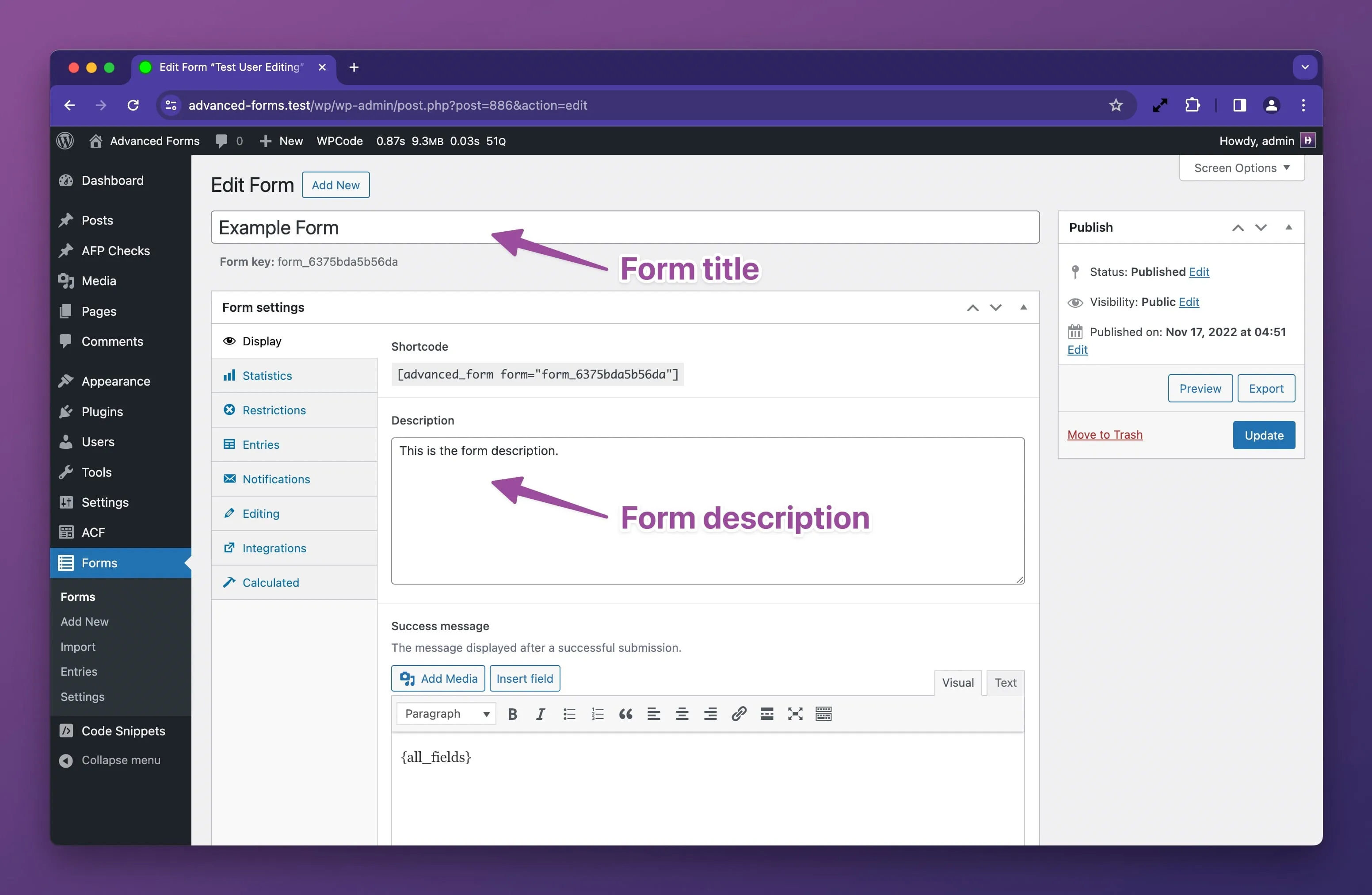
If you wish to do so using PHP, you may use the af/form/before_render filter to modify the form object:
add_filter( 'af/form/before_render', function( $form, $args ) {  // Restrict to a specific form  if( $form['key'] !== 'form_62bd15508b9c9' ){    return;  }
  // Set the title and description  $form['title'] = 'My custom form title';  $form['display']['description'] = 'My custom form description message.';
  return $form;}, 10, 2 );
// You may also use more specific filters to target a form either by its post ID or form keyadd_filter( "af/form/before_render/id=$form_id", ... );add_filter( "af/form/before_render/key=$form_key", ... );
Hiding the title and description
Section titled “Hiding the title and description”When rendering a form, you may toggle the display of the title and description using the
display_title and display_description display arguments.
If you wish to do so using PHP, you may use the af/form/args filter to modify the display args:
add_filter( 'af/form/args', function( $args, $form ) {  // Restrict to a specific form  if( $form['key'] !== 'form_62bd15508b9c9' ){    return $args;  }
  // Toggle the title and description off  $args['display_title'] = false;  $args['display_description'] = false;
  return $args;}, 10, 2 );
// You may also use more specific filters to target a form either by its post ID or form keyadd_filter( "af/form/args/id=$form_id", ... );add_filter( "af/form/args/key=$form_key", ... );
Controlling the field instruction placement
Section titled “Controlling the field instruction placement”You may control where the instructions are rendered on a form using
the instruction_placement display argument.
If you wish to do so via PHP, you may use the af/field/instruction_placement filter:
add_filter( 'af/field/instruction_placement', function( $placement, $field, $form, $args ) {
  // Set either field or label here  $placement = 'field';
  return $placement;}, 10, 4 );
// You may also use more specific filters to target a field either by its name or keyadd_filter( "af/field/instruction_placement/name=$field_name", ... );add_filter( "af/field/instruction_placement/key=$field_key", ... );
Customizing the submit button text
Section titled “Customizing the submit button text”You may pass custom submit button text to the submit_text display argument when
displaying a form.
If you wish to do so using PHP, you may use the af/form/args filter to modify the display args:
add_filter( 'af/form/args', function( $args, $form ) {  // Restrict to a specific form  if( $form['key'] !== 'form_62bd15508b9c9' ){    return $args;  }
  // Set the submit button text. Simple HTML such as <span> tags will work here.  $args['submit_text'] = 'Send message';
  return $args;}, 10, 2 );
// You may also use more specific filters to target a form either by its post ID or form keyadd_filter( "af/form/args/id=$form_id", ... );add_filter( "af/form/args/key=$form_key", ... );
Customizing the form wrapper attributes
Section titled “Customizing the form wrapper attributes”If you need to add custom or modify existing HTML attributes to the <form> element, you may use
the af/form/attributes filter:
add_filter( 'af/form/attributes', function( $attributes, $form, $args ) {  // Restrict to a specific form  if( $form['key'] !== 'form_62bd15508b9c9' ){    return $attributes;  }
  // Set a custom attribute  $attributes['data-foo'] = 'bar';
  return $attributes;}, 10, 3 );
// You may also use more specific filters to target a form either by its post ID or form keyadd_filter( "af/form/attributes/id=$form_id", ... );add_filter( "af/form/attributes/key=$form_key", ... );
Add custom CSS classes for CSS styling
Section titled “Add custom CSS classes for CSS styling”Advanced Forms adds the af-form class to the form wrapper but you may add additional classes as follows:
add_filter( 'af/form/attributes', function( $attributes, $form, $args ) {  // Append a custom classs  $attributes['class'] .= ' my-custom-class';
  return $attributes;}, 10, 3 );
Adding HTML before and after a form
Section titled “Adding HTML before and after a form”You may render custom markup before and after a form using the af/form/enqueue and af/form/after filters:
add_filter( 'af/form/enqueue', function( $form, $args ) {  echo '<div class="my-custom-wrapper">';}, 10, 2 );
add_filter( 'af/form/after', function( $form, $args ) {  echo '</div>';}, 10, 2 );
// You may also use more specific filters to target a form either by its post ID or form keyadd_filter( "af/form/enqueue/id=$form_id", ... );add_filter( "af/form/enqueue/key=$form_key", ... );
add_filter( "af/form/after/id=$form_id", ... );add_filter( "af/form/after/key=$form_key", ... );
Adding HTML before the form title
Section titled “Adding HTML before the form title”If you wish to add custom markup just after the opening <form> tag, you may use the af/form/before_title filter:
add_filter( 'af/form/before_title', function( $form, $args ) {  echo '<p>Some custom element</p>';}, 10, 2 );
// You may also use more specific filters to target a form either by its post ID or form keyadd_filter( "af/form/before_title/id=$form_id", ... );add_filter( "af/form/before_title/key=$form_key", ... );
Adding hidden fields
Section titled “Adding hidden fields”See Working with hidden fields.
Adding HTML before and after all form fields
Section titled “Adding HTML before and after all form fields”If you wish to add custom markup before and after all form fields, you have two sets of hooks to choose from. The first
option in the af/form/before_field_wrapper and af/form/after_field_wrapper hooks. These hooks fire once respectively
before and after all the fields have rendered and encompass the submit button row as well:
add_filter( 'af/form/before_field_wrapper', function( $form, $args ) {  echo '<div class="my-custom-wrapper">';}, 10, 2 );
add_filter( 'af/form/after_field_wrapper', function( $form, $args ) {  echo '</div>';}, 10, 2 );
// You may also use more specific filters to target a form either by its post ID or form keyadd_filter( "af/form/before_field_wrapper/id=$form_id", ... );add_filter( "af/form/before_field_wrapper/key=$form_key", ... );
add_filter( "af/form/after_field_wrapper/id=$form_id", ... );add_filter( "af/form/after_field_wrapper/key=$form_key", ... );
If you wish to add custom markup before and after all the fields but not the submit button row, you may use
the af/form/before_fields and af/form/after_fields hooks:
add_filter( 'af/form/before_fields', function( $form, $args ) {  echo '<div class="my-custom-wrapper">';}, 10, 2 );
add_filter( 'af/form/after_fields', function( $form, $args ) {  echo '</div>';}, 10, 2 );
// You may also use more specific filters to target a form either by its post ID or form keyadd_filter( "af/form/before_fields/id=$form_id", ... );add_filter( "af/form/before_fields/key=$form_key", ... );
add_filter( "af/form/after_fields/id=$form_id", ... );add_filter( "af/form/after_fields/key=$form_key", ... );
Adding HTML before and after field groups
Section titled “Adding HTML before and after field groups”A an Advanced Forms form can contain multiple field groups. If you wish to add custom markup before and after each field
group, you may use the af/field_group/before_field_group and af/field_group/after_field_group hooks.
Note that these hooks don’t yet have specific variations so it is necessary to check for a specific form or field group for controlling when the markup should render.
add_filter( 'af/field_group/before_field_group', function( $field_group, $form, $args ) {  // Restrict to a specific form  if( $form['key'] !== 'form_62bd15508b9c9' ){    return;  }  echo '<div class="my-custom-field-group-wrapper">';}, 10, 3 );
add_filter( 'af/field_group/after_field_group', function( $field_group, $form, $args ) {  // Restrict to a specific form  if( $form['key'] !== 'form_62bd15508b9c9' ){    return;  }  echo '</div>';}, 10, 3 );
Adding HTML before and after fields
Section titled “Adding HTML before and after fields”If you wish to add custom markup before and after each field, you may use the af/field/before_field
and af/field/after_field hooks.
add_filter( 'af/field/before_field', function( $field, $form, $args ) {  echo '<div class="my-custom-field-wrapper">';}, 10, 3 );
add_filter( 'af/field/after_field', function( $field, $form, $args ) {  echo '</div>';}, 10, 3 );
Advanced Forms already wraps fields in <div> elements but you may add additional wrapper markup as needed or you may
wish to include some custom markup before or after a specific field:
add_filter( 'af/field/before_field', function( $field, $form, $args ) { if( $field['name'] === 'my_field_name' ){ echo '<p>Some custom element</p>'; }}, 10, 3 );Customizing the form success message
Section titled “Customizing the form success message”The form success message can be defined on the form edit screen as follows:
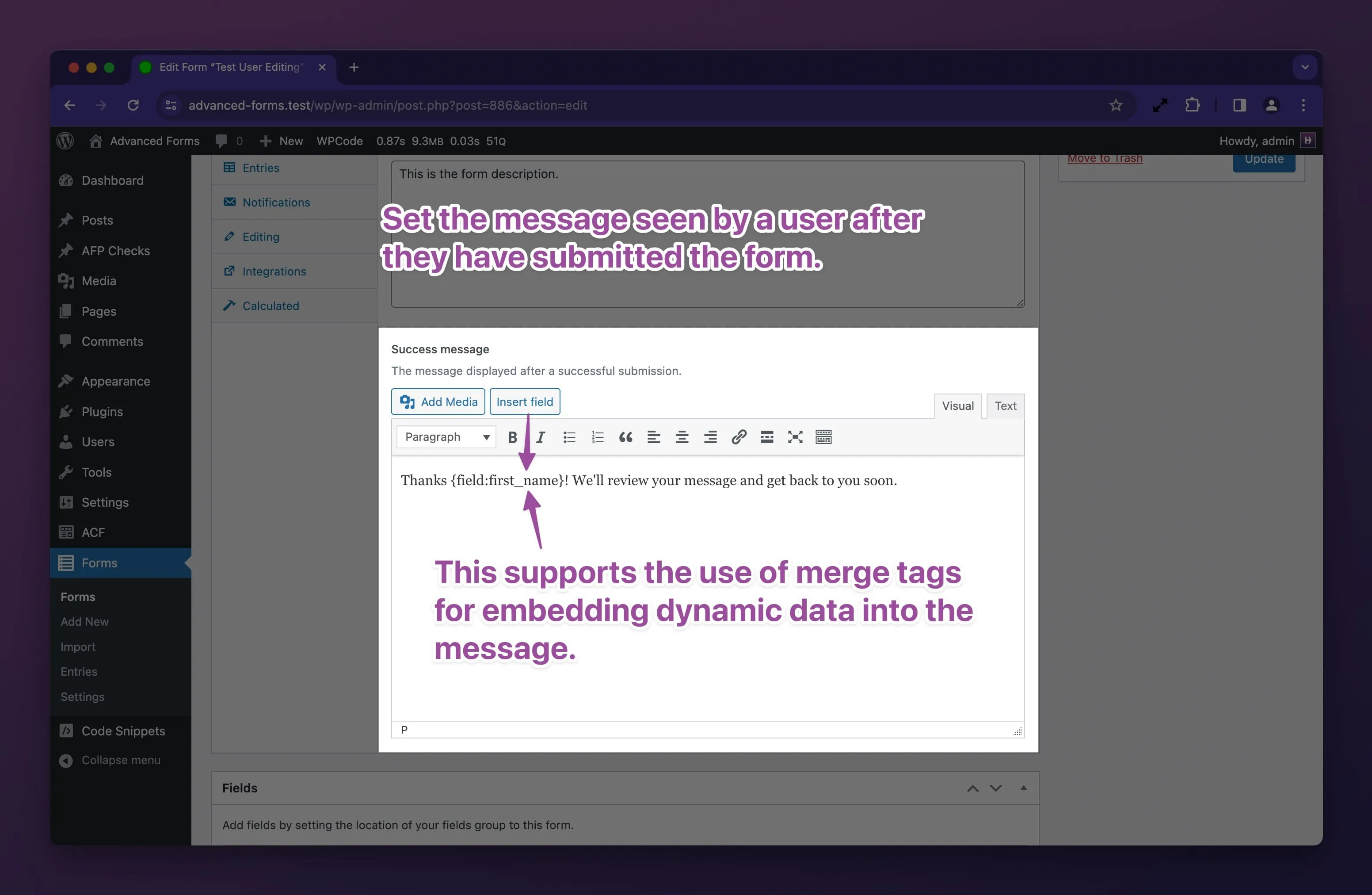
You may also customise the success message with PHP using the af/form/success_message filter:
add_filter( 'af/form/success_message', function( $message, $form, $args ) {  // Set the success message  $message = 'My custom success message';
  return $message;}, 10, 3 );
// You may also use more specific filters to target a form either by its post ID or form keyadd_filter( "af/form/success_message/id=$form_id", ... );add_filter( "af/form/success_message/key=$form_key", ... );
Prefilling form fields
Section titled “Prefilling form fields”Modifying the ACF field array before render
Section titled “Modifying the ACF field array before render”You may modify an ACF field array before it is rendered in a form using the af/field/before_render filter:
add_filter( 'af/field/before_render', function( $field, $form, $args ) {  // Restrict to a specific field  if ( $field['name'] !== 'my_field' ) {    return $field;  }
  // Override the field label  $field['label'] = 'My custom label';
  // Override the placeholder  $field['placeholder'] = 'My custom placeholder';
  // Set a max length  $field['maxlength'] = 20;
  // Change the field type  $field['type'] = 'password';
  // Mark a field as required  $field['required'] = true;
  // Mark a field as disabled  $field['disabled'] = true;
  return $field;}, 10, 3 );
// You may also use more specific filters to target a field either by its field name or keyadd_filter( "af/field/before_render/name=$field_name", ... );add_filter( "af/field/before_render/key=$field_key", ... );
The above options are just a few examples of what is possible and the available options change depending on the field type so be sure to inspect the ACF field array to see what options are available. Not all options may work in a front end form so a degree of trial and error may be required.
How to make a field readonly
Section titled “How to make a field readonly”Making a field readonly is possible but is field type dependent so you should inspect the ACF field type you are using to see what args are supported when ACF renders a field. For example, the following will make a text field readonly:
add_filter( 'af/field/before_render/name=my_text_field', function( $field, $form, $args ) {  $field['readonly'] = true;
  return $field;}, 10, 3 );
Modifying the field wrapper attributes
Section titled “Modifying the field wrapper attributes”If you need to add custom or modify existing HTML attributes to a field’s wrapper element, you may use
the af/form/field_attributes filter:
add_filter( 'af/form/field_attributes', function( $attributes, $field, $form, $args ) {  // Restrict to a specific field  if ( $field['name'] !== 'my_field' ) {    return $attributes;  }
  // Set a custom attribute  $attributes['data-foo'] = 'bar';
  return $attributes;}, 10, 4 );
// You may also use more specific filters to target a form either by its post ID or form keyadd_filter( "af/form/field_attributes/id=$form_id", ... );add_filter( "af/form/field_attributes/key=$form_key", ... );
Add custom CSS classes for CSS styling
Section titled “Add custom CSS classes for CSS styling”Advanced Forms adds classes such as af-field and af-field-type-{$type} to the field wrapper but you may add
additional classes as follows:
add_filter( 'af/form/field_attributes', function( $attributes, $field, $form, $args ) {  // Append a custom class  $attributes['class'] .= ' my-custom-class';
  return $attributes;}, 10, 4 );
Customise the form restricted output
Section titled “Customise the form restricted output”See Restricting access to a form.